


Cadpage
4.31.80K Reviews
App Specs
- Version
- 2.2.13-26GR
- Updated On
- License
- Free
- Downloads
- 100,000+
- Developer
- CADPage
- Categories
- Communication
- Platform
- Android
Screenshots
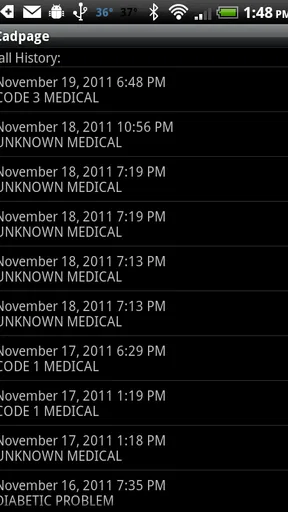
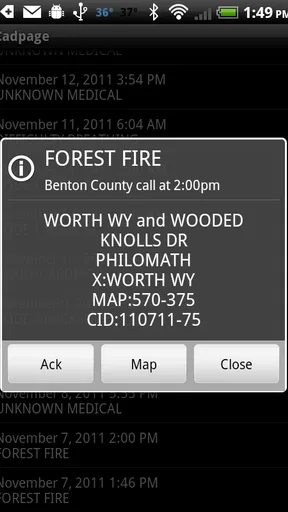
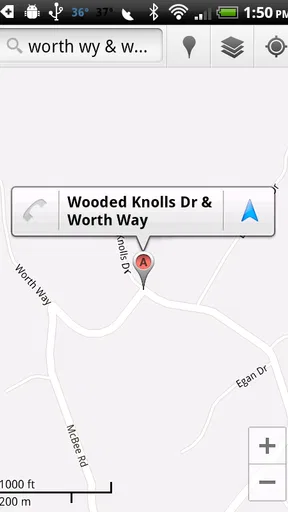
 Analysis by AppCompare
If you are a firefighter or EMS responder, the first question is not whether an app looks polished; it is whether it helps you notice an incident and act without adding confusion. Cadpage is built around that practical need. It is a communication app from CADPage designed for emergency incident response, and its purpose is much narrower than a general messaging app or a social network. I found that focus useful: instead of trying to become an all-purpose communication hub, it concentrates on turning relevant dispatch information into something easier to notice and use when time matters.
The app is free to install, carries an Everyone age rating, and has been available since August 2010. It currently appears as version 2.2.13-26GR and requires Android 6.0 or later. Those details make it approachable for people using older Android phones, although compatibility alone does not guarantee that it will fit every department’s dispatch workflow. Cadpage works best when it matches the way your organization receives and handles emergency calls.
What to expect before you rely on Cadpage
My first impression is that Cadpage is not something I would install casually just to explore. Its value depends on receiving the right emergency information and configuring the app around your working area. A person looking for ordinary texting, group chat, or family location sharing should choose a different communication tool. This is aimed at responders who need incident information presented quickly enough to support a decision about whether and how to respond.
The app’s store summary describes firefighter and EMS emergency incident response, with an emphasis on getting to an incident fast. In practical terms, that means you should think of it as part of an alert-and-response routine rather than as a replacement for every channel your department already uses. If your agency has formal dispatch procedures, Cadpage should complement them, not become an excuse to ignore radio traffic, department instructions, or local safety rules.
That distinction is important for first-time users. A notification on a phone is useful, but it is not automatically the same thing as an official assignment. I would continue treating the department’s normal dispatch channel as authoritative and use Cadpage to make relevant information easier to catch and review. This approach also protects against a common mistake: assuming that a phone alert alone tells you everything needed to make a safe response decision.
CADPage is the developer, and the app has built a noticeable user base for a specialized tool. It has over one hundred thousand installs, an average rating of 4.3, and roughly four thousand ratings. That combination suggests that many responders find the concept useful, while also reminding me that a specialized app can feel excellent in one local setup and awkward in another. Your experience will depend heavily on the dispatch source, the location settings, and how carefully the initial configuration is completed.
I also noticed that the app is not presented as a premium-only product. The main download is free, while in-app purchases are listed at around ten dollars per item. I would not treat the free price as a promise that every possible capability or service is included without conditions. Before depending on it, check what your particular workflow requires and whether any optional purchase is relevant to your use. That is a better approach than paying first and discovering later that the app does not match your department’s setup.
Worth Reading Before You Choose

EA SPORTS FC Mobile 26 Is a Bigger Football Game, but It Takes Time

Flipboard Shows What News Apps Must Do Beyond the Feed

Switching to Android Auto Means Rethinking Your Driving Routine

Google Calendar Makes a Crowded Week Easier to Manage

Ludo King Makes the Most of the Minutes Between Plans

Baby Panda World Brings Quick Play to Modern Phones, but Its Game Library Feels Busy
Who will get the most from it
Cadpage makes the most sense for volunteer firefighters, EMS personnel, and other responders who need a dedicated way to stay aware of emergency incidents while away from a station. It can be especially practical for someone who may be at home, at work, or moving through a normal day when a call comes in. The benefit is not entertainment or convenience in the usual app-store sense; it is reducing the chance that an important dispatch message gets buried among ordinary phone notifications.
I would be more cautious recommending it to a person who is not already connected to a compatible emergency-response process. Without a dependable source of incident messages and a clear understanding of local procedures, installing the app does not create a response system by itself. It also is not the right choice for someone who wants a polished team chat, persistent conversation history, or broad social communication. A department-managed messaging solution may be better for those tasks.
There is another group that should think carefully before using it: responders who regularly work across areas with different dispatch conventions. A setup that is clear in one county may not translate perfectly when the wording, abbreviations, or source format changes elsewhere. If you cover multiple jurisdictions, I would test each one separately and avoid assuming that a familiar address format or incident label will be interpreted the same way everywhere.
Setting it up without rushing the important parts
The safest way to begin is to install Cadpage when you are not already waiting for a call. Give yourself enough time to understand what the app is asking you to configure and to compare the result with the dispatch information your organization normally uses. A rushed setup can create false confidence: the app may appear installed and ready, but the useful part is whether it receives and presents the incidents that matter to you.
Start by identifying the exact dispatch source and service area you need. Do not choose a broad or approximate option simply because its name looks familiar. Emergency systems often use similar names for different areas, and a small configuration error can be more serious here than in an ordinary notification app. I would write down the area or agency details before starting, then check every selection against the terminology used by your department.
Next, pay attention to the phone’s notification behavior. Android can limit background activity, silence alerts, or place an app into a battery-saving state. I would review Cadpage’s notification settings and the phone’s own battery and sound controls, then perform a controlled test rather than waiting for a real call to discover a problem. The exact menus vary by handset, so the useful principle is simple: make sure the phone is allowed to alert you in the way you expect, and verify that a quiet mode or aggressive battery setting is not defeating that plan.
Keep the first configuration deliberately simple. Choose only the incident sources and areas you actually need, because unnecessary alerts can make the important ones easier to overlook. This is one of the less obvious trade-offs with emergency notification tools: adding every available feed may feel safer, but it can produce noise that weakens attention. I would rather begin with a focused setup, confirm that it works, and expand it only when there is a clear operational reason.
Before considering the setup complete, compare a received incident with the original dispatch wording. Look for the address, incident type, and any other details that your normal procedure expects you to recognize. If the app presents a shortened or reformatted message, learn which parts are easy to scan and which parts require opening the full item. This small exercise matters because speed comes from familiarity, not just from having an alert arrive.
How to reach the first meaningful success
Your first successful action should be a controlled verification, not a real emergency response. Ask an appropriate department contact how Cadpage should be tested in your area, or use whatever non-emergency test process your organization permits. The goal is to confirm a complete path: the incident source produces a message, Cadpage receives it, the phone alerts you, and you can read the useful details without hesitation.
When that test arrives, pause long enough to inspect the presentation. Can you distinguish the alert from ordinary notifications? Is the location readable at a glance? Do you know where to find the rest of the incident information? I would also check whether the alert remains easy to revisit after the initial sound or banner disappears. In a real situation, a responder may need to look again while putting on equipment or coordinating with others, so the ability to return to the message is part of practical usability.
A good first workflow is to read the alert, confirm the jurisdiction and incident type, compare it with the official channel, and then follow your department’s response procedure. That sequence keeps Cadpage in the role it handles best: helping you notice and organize incoming incident information. It also prevents the app from becoming a source of accidental overconfidence.
One useful habit is to create a personal recognition pattern for common dispatch messages. I would learn where the address usually appears, how the incident description is phrased, and which abbreviations require extra attention. This is more valuable than simply memorizing where buttons are located. In an emergency, reducing the time spent interpreting familiar information can matter more than having a long list of advanced settings.
Consider a realistic everyday situation. Imagine that you are at work and your phone is in a pocket while normal messages and calls are arriving. A dispatch alert appears, and you need to decide whether it is relevant before stepping away from your job. Cadpage can help by putting the incident information into a responder-focused flow rather than leaving you to search through a general inbox. You still need to verify the call through your department’s procedure, but the app can shorten the path from noticing the alert to understanding why it matters.
Where new users commonly get confused
The biggest confusion is treating Cadpage as a universal emergency notification service. It is not a substitute for being enrolled in the right local dispatch process. If the underlying source does not deliver the incident to your phone, the app cannot invent that information. This is why setup should begin with your department or dispatch arrangement, not with random experimentation inside the app.
Another point of confusion is assuming that every alert deserves the same response. The app can bring an incident to your attention, but relevance still depends on your role, location, availability, and department rules. I would avoid configuring it in a way that encourages impulsive action based only on a notification. A clear alert is helpful; a clear decision still requires training and official procedure.
Notification timing can also be misunderstood. A phone may be offline, muted, low on power, restricted by its operating system, or in an area with weak connectivity. None of those problems necessarily means the app is broken. For that reason, I would maintain a backup awareness habit: keep up with the official communication method and make sure other members of your response team know how you are expected to receive assignments.
People may also wonder whether an older Android phone can run the app. The minimum requirement is Android 6.0, so devices on that version or newer meet the stated operating-system requirement. Still, an older phone may have different notification controls, slower performance, or a battery that does not last through a long day. I would test on the actual device you carry, rather than assuming that compatibility on paper equals dependable field use.
Privacy and attention deserve practical consideration too. Emergency messages can contain sensitive location or incident details, so I would avoid displaying them openly where other people can casually read the screen. Use a lock screen and follow your organization’s rules for handling dispatch information. At the same time, do not hide alerts so aggressively that you make them difficult to notice. The right balance is discreet presentation with dependable awareness.
How it compares with ordinary communication alternatives
Compared with SMS, Cadpage has a clearer emergency-response purpose. Text messaging is familiar and flexible, but a normal inbox mixes dispatch information with personal conversations, promotions, and unrelated alerts. That makes it easy to miss something important. Cadpage’s narrower focus is its strongest argument: it is designed around incident awareness rather than general conversation.
Compared with a department group chat, the difference is even sharper. Group chats are useful for discussion, coordination, and follow-up, but they can become noisy and may not present an incoming incident in a consistent way. Cadpage is better suited to the first moment when you need to recognize what is happening. A chat platform may still be better once the team needs to exchange updates, ask questions, or coordinate non-dispatch details.
Compared with a radio, the app is more convenient for someone who is not carrying a radio continuously, but it should not be treated as a replacement for live operational communication. Radio traffic can provide context, corrections, and immediate interaction that a phone alert cannot replicate. My preferred arrangement would use Cadpage as an additional awareness layer, with the official radio or department system remaining central to response decisions.
The trade-off is specialization. A general notification tool may be easier for a household or informal group, while Cadpage is more relevant when the user’s work is tied to firefighter or EMS incidents. If you need a broad communication platform, choose that platform. If you need a focused way to notice emergency dispatch information, this app has a more convincing reason to exist.
What I would do after the first successful test
Once the basic alert path works, I would not immediately change everything. Use the app during ordinary days and observe whether the alerts are relevant, understandable, and easy to revisit. Keep notes about missed notifications, unnecessary messages, or confusing incident wording. Those observations will tell you more than a quick installation screen can.
Then refine the setup with your department’s guidance. Remove areas that do not concern you, confirm that the remaining sources are appropriate, and repeat a permitted test after significant phone or operating-system changes. This is an advanced but simple insight: reliability is not a one-time installation result. Battery settings, notification rules, and device replacements can quietly change how an alert behaves.
I would also decide in advance what I will do when an alert is unclear. For me, that means checking the official channel, contacting the appropriate department resource if required, and avoiding assumptions based on a partial address or abbreviated description. Having that decision path ready reduces the temptation to improvise under pressure.
There is a reasonable financial question as well. The app itself is free, but optional in-app items are listed at around ten dollars each. I would first prove that the core workflow fits my needs and only then consider whether an optional purchase has a clear benefit for my situation. A responder should not pay for an add-on merely because the app is specialized; the purchase should solve a specific problem in the established workflow.
After using it for a while, the key test is not whether Cadpage replaces every other communication method. It is whether it helps you notice the right incident, understand the basic information quickly, and move into your official response process with less friction. In my experience, that is the standard that makes sense for this app.
My recommendation is practical rather than universal: if you are an active firefighter or EMS responder with a compatible local dispatch workflow, Cadpage is worth testing carefully. Its focused design can be more useful than ordinary messages when the main challenge is noticing relevant incidents among everyday phone activity. If you are looking for team chat, casual messaging, or a standalone emergency service, I would skip it and choose a tool built for that job instead.
The app is not a shortcut around training, dispatch procedures, or good judgment. It is a focused communication aid, and its success depends on correct setup and sensible backup habits. For the right user, that narrow purpose is exactly the advantage. For everyone else, it is likely to feel too specialized. That is why I would install Cadpage only after confirming that it matches your department’s process, then judge it by a real, permitted test rather than by the download screen alone.
CADPage has kept the concept centered on emergency incident response, and that clarity is its most convincing quality. With the appropriate Android device, a verified local setup, and realistic expectations about what a phone alert can and cannot do, it can become a useful part of a responder’s daily readiness routine.
Pros
- Quickly identifies emergency calls and displays useful incident details.
- Supports many public safety agencies and dispatch systems.
- Can help users understand nearby incidents without calling emergency services.
- Provides customizable alert settings for different notification preferences.
- Useful for volunteers
- responders
- and safety-conscious community members.
Cons
- Coverage and accuracy depend on supported agencies and available dispatch data.
- Some features may require a paid subscription or in-app purchase.
- Frequent alerts can become distracting in areas with heavy emergency activity.
- Incident details may be delayed
- incomplete
- or difficult for newcomers to interpret.
- The interface can feel utilitarian compared with more modern safety apps.
FAQs for Cadpage
What is Cadpage and what does it do?
Cadpage is a public-safety app designed to receive and display emergency dispatch information, such as fire, rescue, medical, and other incident alerts. It can help volunteers and responders quickly review call details, including the location and nature of an event. The app is mainly useful in areas supported by its dispatch-data sources, so availability and accuracy may vary by region.
Does Cadpage work everywhere, or is it limited to certain locations?
Cadpage does not provide universal coverage. Its functionality depends on whether the local emergency dispatch system is supported and whether the relevant data can be accessed reliably. Before downloading, users should check compatibility for their county, municipality, or department. Even in supported areas, service interruptions, changes to dispatch feeds, or local system limitations may affect the alerts received.
Does Cadpage replace an official emergency notification system or 911 service?
No. Cadpage should be treated as a supplemental notification and information tool, not as a replacement for 911, official public-alert systems, radio communications, or instructions from emergency authorities. Notifications can be delayed, incomplete, or unavailable because of network problems, device settings, or dispatch-feed issues. Users should always contact the appropriate emergency service directly when reporting an incident or facing an emergency.
What permissions and phone features does Cadpage require?
Depending on the version and platform, Cadpage may need permission to send notifications, use an internet connection, access location-related features, or operate in the background. These permissions support receiving alerts and presenting useful incident information, but they may affect battery usage and privacy considerations. Review the app’s permission requests carefully, enable notifications, and check battery-optimization settings so important alerts are not silently blocked.
Is Cadpage free to download, and are there any costs or limitations?
Cadpage’s availability, pricing, and included features can depend on the platform, region, and current app version. Some functions or supported services may require a subscription, purchase, or separate setup, while other features may be available without payment. Check the official store listing before installing for the latest information about in-app purchases, trial terms, supported dispatch areas, and any limitations that could affect your use.


